Fiscal year 2020 calendar: 8 free printable PDF templates
October 1, 2019 to September 30, 2020: one and two pages.
In PDF format with US holidays. Free to download and print.
Advertisement
Find the right fiscal year calendar for FY2020
The whole fiscal year on one page
Seven of the 8 templates fit all twelve months on a single sheet: month columns with every date on its own row (templates 1 and 6, or two half-year blocks in template 5), a timeline with the days running across the page (template 3), a fiscal year at a glance with a holiday table (templates 4 and 7, the portrait one with one quarter per row) or continuous weeks with a column for holidays and notes (template 8).
More room to write
Template 2, with six months on each of two landscape pages, gives you deeper day rows for close dates, filing deadlines and contract milestones.
Color-coded fiscal quarters
Q1 (October to December 2019) is light orange, Q2 (January to March 2020) light blue, Q3 (April to June) light green and Q4 (July to September) light purple, on the month headings and the weekends, while the space you write in stays white. As the sheets do not print "Q1" to "Q4", they suit any quarter numbering. To save color ink, you can print any template in black and white.
Landscape or portrait
Templates 1 to 4 are in landscape and templates 5 to 8 in portrait, all sized for US Letter paper (8.5 x 11 inches).
Federal holidays already marked
Every federal holiday of FY2020 is shaded pale red, and when one falls on a weekend, the observed day off is marked too (see observed holidays in our FAQ). Most templates print the holiday name beside the date; the timeline shades holidays without a name.
Ready to print
Open the PDF calendar in your browser or any PDF reader and print the whole fiscal year, or just the half you need. Choose "Actual size" (100%) for US Letter paper, or "Fit to page" if your printer cuts off the edges. Want to type in budget dates first? Use the editable Excel or Word version of the same calendars.
Fiscal calendars 2020 in PDF format,
landscape orientation (4 templates)
Wide sheets for a desk pad, a wall or a landscape printout - the full fiscal year, half a year per page.

Template 1 (PDF)
Printable fiscal calendar 2020
landscape, 1 page
- starts October 1, 2019 and ends September 30, 2020
- months arranged horizontally (along the top), days vertically
- all twelve months of the fiscal year on a single landscape page
- every date carries its weekday abbreviation, so no counting back to figure out a Tuesday
- federal holiday names printed in red beside the date, Easter shown as a plain label
- month headings and weekend cells shaded in the color of their fiscal quarter
- days a month does not have are grayed out, keeping the columns lined up
- portrait counterpart: template 6
Download template 11 page · 26 KB · pdf file

Template 2 (PDF)
Printable fiscal calendar 2020
landscape, 2 pages
- starts October 1, 2019 and ends September 30, 2020
- months arranged horizontally (along the top), days vertically
- half a year (six months) per page, on two landscape sheets
- taller day rows than template 1, for longer entries or several per day
- page one covers Q1 and Q2, page two covers Q3 and Q4
- federal holiday names printed in red beside the date
- quarter colors carried on the month headings and the weekend cells
Download template 22 pages · 29 KB · pdf file

Template 3 (PDF)
Printable fiscal calendar 2020
landscape, 1 page, days horizontally
- starts October 1, 2019 and ends September 30, 2020
- linear calendar (days arranged horizontally)
- names of the months arranged vertically down the left side
- day numbers 1 to 31 along the top and repeated along the bottom edge
- ideal as a fiscal year project timeline tracker, Gantt-style planner or wall chart
- weekends and federal holidays shaded, holidays without a name (a one-day cell has no room)
- each month row carries its quarter color, so Q1 to Q4 read as four bands down the sheet
Download template 31 page · 26 KB · pdf file

Template 4 (PDF)
Printable fiscal calendar 2020
landscape, 1 page, year at a glance
- starts October 1, 2019 and ends September 30, 2020
- classic 12-month planner design, four month blocks across and three down
- table of US federal holidays for fiscal year 2020 printed at the bottom of the sheet
- days of the week in columns, Sunday to Saturday, in every month block
- month heading and weekend columns shaded in the quarter color
- the whole fiscal year in view at once, for a wall, a bulletin board or a desk pad
- good for a handout that shows when the office is closed
- portrait counterpart: template 7
Download template 41 page · 26 KB · pdf file
Fiscal calendars 2020 in PDF format,
portrait orientation (4 templates)
Upright sheets for a binder, a clipboard or a door - the same fiscal year 2020in portrait layouts, including two you will not find in landscape.

Template 5 (PDF)
Printable fiscal calendar 2020
portrait, 1 page, two 6-month blocks
- starts October 1, 2019 and ends September 30, 2020
- one portrait page, in two blocks of six months
- upper block covers Q1 and Q2, lower block covers Q3 and Q4
- each date on its own row with the weekday beside it
- federal holiday names printed in red beside the date
- fits a binder, a clipboard or a folder without folding
- see template 2 for the same half-year split on two landscape pages
Download template 51 page · 27 KB · pdf file

Template 6 (PDF)
Printable fiscal calendar 2020
portrait, 1 page
- starts October 1, 2019 and ends September 30, 2020
- all twelve months of the fiscal year on a single portrait page
- day numbers 1 to 31 down both edges, months as columns across the sheet
- read across a row to compare the same date in every month
- good for lining up monthly reporting dates and recurring payment runs
- federal holiday names printed in red beside the day
- month headings and weekend cells shaded in the quarter color
- landscape counterpart: template 1
Download template 61 page · 28 KB · pdf file

Template 7 (PDF)
Printable fiscal calendar 2020
portrait, 1 page, year at a glance
- starts October 1, 2019 and ends September 30, 2020
- twelve month blocks, three across and four down, on one portrait page
- one fiscal quarter per row: Q1, Q2, Q3 and Q4 read down the sheet
- each row shaded in its own quarter color, orange, blue, green and purple
- table of US federal holidays for fiscal year 2020 printed at the foot
- days of the week in columns, Sunday to Saturday, in every month block
- landscape counterpart: template 4
Download template 71 page · 27 KB · pdf file
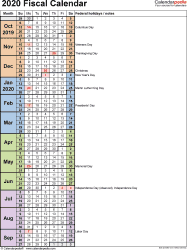
Template 8 (PDF)
Printable fiscal calendar 2020
portrait, 1 page, continuous (rolling) layout
- starts October 1, 2019 and ends September 30, 2020
- continuous (rolling) week rows, running straight through the fiscal year
- weeks that cross a month boundary are shown once, in full
- month names in colored blocks down the left, shaded by fiscal quarter
- "Federal holidays / notes" column down the right, with holiday names already filled in
- plenty of room per week for notes, actions or a running commentary
- suits weekly reporting, sprint planning and payroll weeks
Download template 81 page · 26 KB · pdf file
Fiscal year 2020 by quarter
The four quarters of FY2020
Q1 FY2020 (first quarter): October 1 to December 31, 2019
92 days, 62 of them working days. Federal holidays: Columbus Day (Mon, Oct 14), Veterans Day (Mon, Nov 11), Thanksgiving Day (Thu, Nov 28) and Christmas Day (Wed, Dec 25). Daylight Saving Time ends on Sunday, November 3.
Q2 FY2020 (second quarter): January 1 to March 31, 2020
91 days, 62 of them working days. Federal holidays: New Year's Day (Wed, Jan 1), Martin Luther King Day (Mon, Jan 20) and Presidents' Day (Mon, Feb 17). Daylight Saving Time begins on Sunday, March 8.
Q3 FY2020 (third quarter): April 1 to June 30, 2020
91 days, 64 of them working days. Federal holiday: Memorial Day (Mon, May 25).
Q4 FY2020 (fourth quarter): July 1 to September 30, 2020
92 days, 64 of them working days. Federal holidays: Independence Day (Sat, Jul 4, observed Fri, Jul 3) and Labor Day (Mon, Sep 7).
The whole fiscal year
FY2020 runs from Tuesday, October 1, 2019 to Wednesday, September 30, 2020: 366 days (February 29, 2020 falls in this fiscal year), 262 weekdays and 252 working days. Working days are Monday to Friday, not counting the federal holidays and their observed days - handy for spreading a budget, a staffing plan or a contract deliverable evenly across the quarters. A federal holiday that falls on a Saturday is observed on the Friday before, and one that falls on a Sunday on the Monday after.
About the federal fiscal year
Why it is called FY2020
A fiscal year is named after the year in which it ends, not the year in which it starts, so the US federal government fiscal year that starts on October 1, 2019 and ends on September 30, 2020 is the fiscal year 2020 (often written FY2020 or FY20), not fiscal year 2019/20 or 2019-2020. If you have been handed a date range rather than a year number, it saves a lot of second-guessing to know that October 2019 to September 2020, the fiscal year 2019-2020 and FY2020 all mean the same twelve months. Fiscal years in other jurisdictions can run to different dates; see Fiscal year on Wikipedia.
Why the federal fiscal year starts on October 1
The federal fiscal year has begun on October 1 since fiscal year 1977; before that it started on July 1. The Congressional Budget and Impoundment Control Act of 1974 moved the start date three months later to leave Congress more room between the President's budget request and the start of the year that request pays for. That is why these fiscal calendars open in October 2019 instead of January, and why the first quarter of FY2020 is October, November and December 2019 rather than January to March.
Fiscal year calendar, split year calendar or yearly calendar?
The federal fiscal year is only one of several twelve-month spans that do not start in January. For a year that runs from July 2019 to June 2020, see the split year calendars 2019/20. The school calendars 2019/20 run from August 2019 to July 2020, and the academic calendars 2019/20 from September 2019 to August 2020. And if your year is the standard January to December one, see the yearly calendars for 2020.
Planning FY2020 with a fiscal year calendar
What to add to your fiscal year calendar
The dates that matter in a fiscal year are rarely the ones already on a calendar, so the templates leave the writing space clear for them: budget and appropriations milestones, including the date any continuing resolution runs to; quarterly close and reporting deadlines for Q1, Q2, Q3 and Q4; contract periods of performance, option year start dates and renewal or recompete deadlines; grant application windows, drawdown schedules and grant reporting deadlines; invoicing and payment schedules alongside the pay periods on your payroll calendar; audit fieldwork, internal review cycles and the September 30 year-end close; obligation deadlines and end-of-year spending cutoffs; travel, training and conference budgets planned quarter by quarter; and board, committee and program review dates across the annual planning cycle.
Who these fiscal year calendars are for
Anyone whose funding, reporting or contract year runs October to September rather than January to December: finance, accounting and budget teams working to the federal fiscal year, program and project managers in federal agencies, government contractors and subcontractors tracking periods of performance, grant recipients and grant writers working to federal award cycles, payroll administrators and bookkeepers, auditors and compliance staff, and analysts who need a fiscal year planner they can mark up rather than a calendar year one. The same templates work just as well as a personal fiscal year journal for tax planning and forecasting, if your own financial planning cycle happens to match the federal one.
Ideas for your printable FY2020 calendar
On the office wall, with the deadlines marked
Print the fiscal year on 11 x 17 inch Tabloid paper with "Fit to page" for the budget office or a program team, or on cardstock so it hangs flat beside the desk. Write the quarterly close and reporting dates, option year start dates and the September 30 year-end into the days, and the deadlines of FY2020 stay in view without opening a single file.
Writing on your printable fiscal year calendar by hand
Pencil in reminders two weeks before each deadline and ink them in once the date is final, draw a line across audit fieldwork and contract periods of performance, and check off each report as it goes in. Laminated, the calendar takes dry-erase markers, so the same sheet can track a spend plan that changes month by month.
Using the templates
Terms of Use
All templates on this site may be used free of charge, at home, at work and at school, provided that the Calendarpedia logo, the copyright notice with the website address ("© Calendarpedia® www.calendarpedia.com") and the disclaimer ("Data provided 'as is' without warranty") stay on the template. The templates may not be sold or built into products that are sold, and the blank templates (or copies with only minor changes) may not be offered for download on other websites. All content on this site is protected by copyright © 2011-2026 Calendarpedia®. All rights reserved. Data is provided 'as is' without warranty of any kind, may contain errors and is subject to change without notice. If you find a mistake, please let us know. Full details are in our Terms of Use.
System requirements and compatibility
Every template is saved in PDF (.pdf) format, the ISO-standardized document format (ISO 32000) that every device can open.
- Nothing to install
The file opens straight in the browser you are already using, on Windows, Mac, iPhone, iPad, Android and Chromebook alike, in Chrome, Edge, Safari and Firefox. Most computers also have a PDF viewer built in, such as Preview on a Mac or Microsoft Edge on Windows, so a double-click is usually all it takes. - Or use a dedicated PDF reader
Adobe Acrobat Reader is free for Windows, Mac, Android and iOS, and free alternatives such as Foxit Reader and Sumatra PDF open these files just as well. None of them is required: use one if you prefer it, not because the template needs it. - Open it from Google Drive
Upload the file to Google Drive and you can view and print it from anywhere you sign in, on any device, without installing anything. - Printing from a phone, tablet or Chromebook
You do not need a computer to get the template onto paper. On an iPhone or iPad, open the PDF and choose Share, then Print, and any AirPrint printer on your Wi-Fi will pick it up. On an Android phone, use the print option in the app's menu (under Share or the three-dot menu). On a Chromebook, Ctrl+P sends it to any printer already set up in Chrome. If there is no printer within reach, save the file to a USB drive or email it to yourself and print your template at the office, at a library or at a print shop. - Printing in black and white
To save color ink, you can print any template in black and white: the PDF reader or browser prints the colors as shades of gray. - Older devices and software
PDF has been the standard format for printable documents for many years, so the files also open in older PDF readers and on older computers, without any conversion.
Problems downloading, opening or printing a template?
Our FAQ explains how to print a template in a different size or in black and white, what to do if the edges are cut off, a download doesn't work or a file won't open in Excel or Word, and which other programs you can use.