Two-year calendar 2017-2018: 5 free editable Excel templates
24 months on one page, with the federal holidays of both years.
Type in your plans in Excel or Google Sheets.
Advertisement
Find the right two-year calendar for 2017 and 2018
Layouts and colors
Templates 1 and 3 put 2017 and 2018 side by side, while in template 2 and in the portrait templates 4 and 5, 2018 sits below 2017. Templates 1 and 4 are "rainbow calendars" with each month in its own color, template 2 shows Sundays in red and Saturdays in blue, and templates 3 and 5 have the standard design. To save color ink, you can print any template in black and white.
Landscape or portrait
Templates 1 to 3 are in landscape and templates 4 and 5 in portrait, all on US Letter paper (8.5 x 11 inches). With 24 months on one sheet the day boxes are small; for a bigger wall planner, you can print it in a larger size such as 11 x 17 inches (Tabloid) with "Fit to page".
Federal holidays of both years
All templates mark the US federal holidays of 2017 and 2018 and, when a holiday falls on a weekend, the observed day off as well, so you can plan long weekends and vacations across both years.
Edit in Excel, then print
Color in vacations, deadlines or project phases, or add your own logo alongside the Calendarpedia logo (our FAQ shows how to add your own dates, colors or logo). The day cells hold the dates, so longer notes go beside the calendar or in a text box. The Excel calendar also opens in Google Sheets and Excel for the web. Prefer to write by hand? The same calendars are available as PDF files.
Two year calendars 2017/18 for Microsoft Excel,
landscape orientation (3 templates)
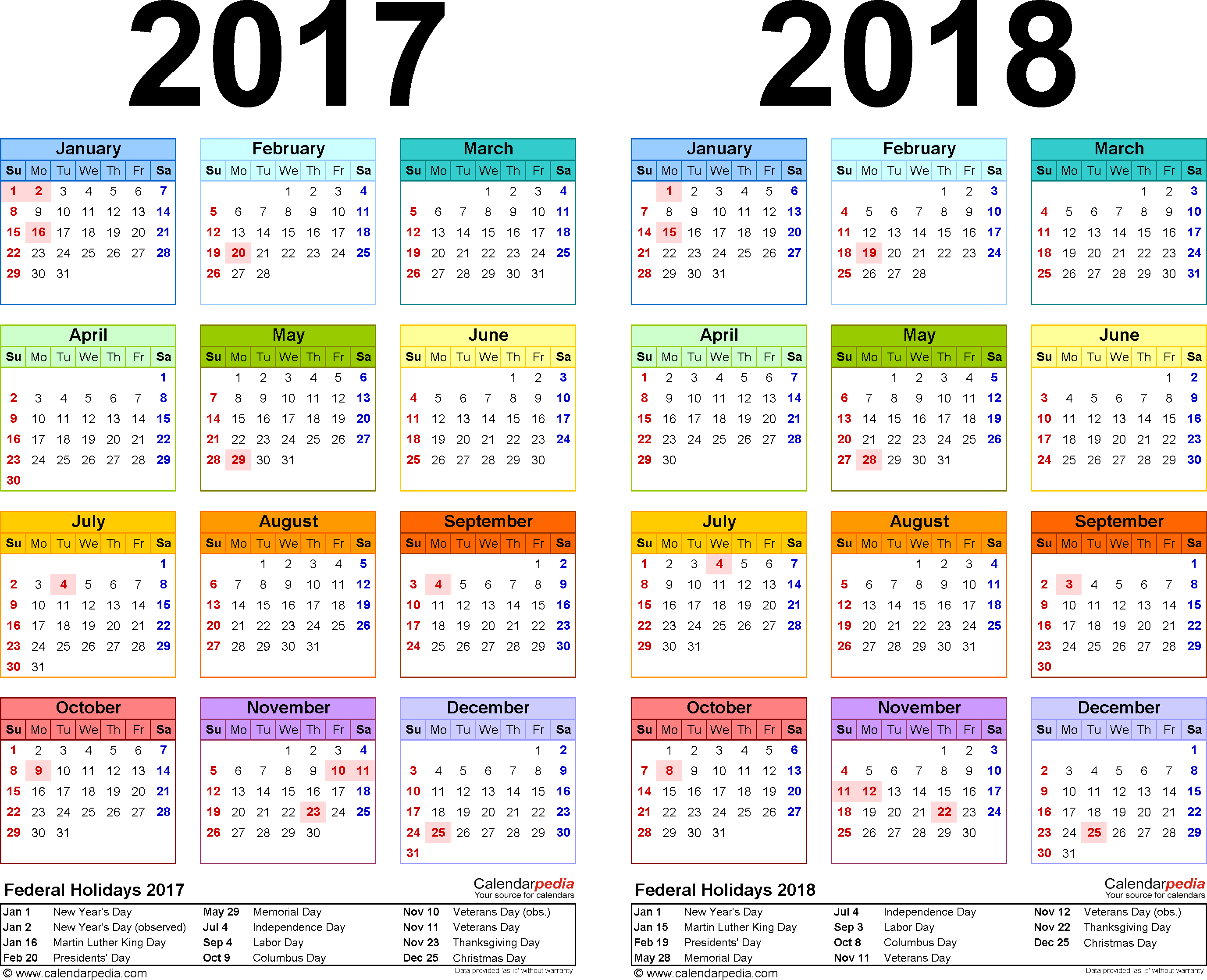
landscape, years side by side, in color
Template 1:
Two year calendar 2017 and 2018
landscape, years side by side, in color
- runs from January 1, 2017 to December 31, 2018
- two yearly calendars on one page, arranged side by side
- landscape orientation (horizontal)
- in "rainbow" color scheme that reflects the changing of the seasons
- each month shaded in a different color that visually separates and distinguishes it for easy recognition and navigation
- makes it easy to scan the year while still reading each month independently
- US edition with federal holidays and observances
- free to download, editable, customizable, easily printable
Download template 11 page · 31 KB · xlsx file

landscape, years stacked, red/blue
Template 2:
Two year calendar 2017 and 2018
landscape, years stacked, red/blue
- runs from January 1, 2017 to December 31, 2018
- two yearly calendars on one page, arranged on top of each other
- landscape orientation (horizontal)
- months as classic month grids, read row by row
- Sundays in red on pale red background
- Saturdays in blue on pale blue background
- US edition with federal holidays and observances
- free to download, editable, customizable, easily printable
Download template 21 page · 27 KB · xlsx file

landscape, years side by side
Template 3:
Two year calendar 2017 and 2018
landscape, years side by side
- runs from January 1, 2017 to December 31, 2018
- two yearly calendars on one page, arranged side by side
- landscape orientation (horizontal)
- US edition with federal holidays and observances
- free to download, editable, customizable, easily printable
Download template 31 page · 29 KB · xlsx file
Two year calendars 2017/18 for Microsoft Excel,
portrait orientation (2 templates)

portrait, years stacked, in color
Template 4:
Two year calendar 2017 and 2018
portrait, years stacked, in color
- runs from January 1, 2017 to December 31, 2018
- two yearly calendars on one page, arranged on top of each other
- portrait orientation (vertical)
- in "rainbow" color scheme that reflects the changing of the seasons
- each month shaded in a different color that visually separates and distinguishes it for easy recognition and navigation
- makes it easy to scan the year while still reading each month independently
- US edition with federal holidays and observances
- free to download, editable, customizable, easily printable
Download template 41 page · 30 KB · xlsx file

portrait, years stacked
Template 5:
Two year calendar 2017 and 2018
portrait, years stacked
- runs from January 1, 2017 to December 31, 2018
- two yearly calendars on one page, arranged on top of each other
- portrait orientation (vertical)
- US edition with federal holidays and observances
- free to download, editable, customizable, easily printable
Download template 51 page · 27 KB · xlsx file
Key dates 2017 and 2018 in the US
2017 and 2018 at a glance
Days in the two years
January 1, 2017 is a Sunday and December 31, 2018 a Monday, so the calendar covers 730 days, as neither year is a leap year. That makes 521 weekdays from Monday to Friday across both years. All leap years are listed on our page leap years.
Federal holidays 2017
There are ten federal holidays in 2017:
There are ten federal holidays in 2017:
- Sunday, January 1: New Year's Day (observed Monday, January 2)
- Monday, January 16: Martin Luther King Day
- Monday, February 20: Presidents' Day
- Monday, May 29: Memorial Day
- Tuesday, July 4: Independence Day
- Monday, September 4: Labor Day
- Monday, October 9: Columbus Day
- Saturday, November 11: Veterans Day (observed Friday, November 10)
- Thursday, November 23: Thanksgiving Day
- Monday, December 25: Christmas Day
Federal holidays 2018
There are ten federal holidays in 2018:
There are ten federal holidays in 2018:
- Monday, January 1: New Year's Day
- Monday, January 15: Martin Luther King Day
- Monday, February 19: Presidents' Day
- Monday, May 28: Memorial Day
- Wednesday, July 4: Independence Day
- Monday, September 3: Labor Day
- Monday, October 8: Columbus Day
- Sunday, November 11: Veterans Day (observed Monday, November 12)
- Thursday, November 22: Thanksgiving Day
- Tuesday, December 25: Christmas Day
Observed days and long weekends
A federal holiday that falls on a Saturday is observed on the Friday before, and one that falls on a Sunday on the Monday after (see observed holidays in our FAQ), which gives you a three-day weekend. In 2017, two federal holidays fall on a weekend: New Year's Day (Sunday, January 1, observed Monday, January 2) and Veterans Day (Saturday, November 11, observed Friday, November 10). In 2018, one federal holiday falls on a weekend: Veterans Day (Sunday, November 11, observed Monday, November 12).
Easter and Daylight Saving Time
Easter Sunday falls on April 16 in 2017 and April 1 in 2018. Easter is not a federal holiday, but Good Friday is a state holiday in a few states, such as Connecticut and Hawaii. Daylight Saving Time begins on Sunday, March 12, 2017 and Sunday, March 11, 2018, when the clocks go forward one hour, and ends on Sunday, November 5, 2017 and Sunday, November 4, 2018, when they go back one hour.
Planning with a two-year calendar
Ways to use a two-year calendar
Two years on one page help wherever plans run past the end of the year: long projects and contracts with their start dates, milestones and deadlines, a two-year plan for a degree, an apprenticeship or a certification, leases, warranties, subscriptions and other dates that come up again next year, a pregnancy, a training plan, a family calendar for a move, a new baby or a wedding, a vacation plan for this year and next, or a sports or school season that runs from fall to spring. Pinned up as a 24-month wall calendar or kept on your desk as a two-year planner, it lets you count the weeks to any date at a glance.
Two-year, yearly or three-year calendar?
For more room to write in each day, see the yearly calendars for 2017 and 2018. For a plan that runs even longer, the three-year calendars for 2017 to 2019 put 36 months on one page.
Ideas for your two-year calendar 2017-2018 in Excel
Color-code projects across the years
Give each project, contract or phase its own fill color and shade the days it runs from one year into the next, and the overlaps show right away. Format Painter copies a color from one run of days to the next, and a short key in an empty cell explains the colors.
A copy per team and a list of milestones
Right-click the sheet tab, choose Move or Copy and check "Create a copy" to give each team or project its own two-year calendar in the same workbook. Keep a second worksheet listing milestones and renewals with the date, the project and the owner, and Sort & Filter puts them in date order or shows one project at a time.
Using the templates
Terms of Use
All templates on this site may be used free of charge, at home, at work and at school, provided that the Calendarpedia logo, the copyright notice with the website address ("© Calendarpedia® www.calendarpedia.com") and the disclaimer ("Data provided 'as is' without warranty") stay on the template. The templates may not be sold or built into products that are sold, and the blank templates (or copies with only minor changes) may not be offered for download on other websites. All content on this site is protected by copyright © 2011-2026 Calendarpedia®. All rights reserved. Data is provided 'as is' without warranty of any kind, may contain errors and is subject to change without notice. If you find a mistake, please let us know. Full details are in our Terms of Use.
System requirements and compatibility
Every template is saved in Microsoft Excel (.xlsx) format, the Office Open XML spreadsheet format standardized as ISO/IEC 29500.
- Microsoft Excel
The templates open in Excel 2007 and later for Windows, Excel 2008 and later for Mac, Microsoft 365 and Excel for the web. - Google Sheets
The .xlsx files open in Google Sheets with the layout intact, so you can fill the template in from a browser on any computer, tablet or phone without installing anything. - Free alternatives
If you do not have Excel installed, Microsoft 365 for the web is free to use in a browser, and free desktop alternatives such as FreeOffice PlanMaker and LibreOffice Calc open our templates without formatting errors. Apple's Numbers opens the files too, but the layout may shift, and OpenOffice Calc unfortunately has formatting problems with some of our calendars. - Editing on a phone or tablet
The Excel app for Android and iOS and the Google Sheets app both open these files, so you can add or check an entry away from your desk and print the sheet later from any computer. - Your own dates, colors and logo
Type your entries straight into the day cells, shade the days that matter to you and add your own logo alongside the Calendarpedia logo - our FAQ shows how to add your own dates, colors or logo. - Printing in black and white
To save color ink, you can print any template in black and white. - Older versions of Excel
Excel 2003 and older versions can't open .xlsx files directly. Open the template in Excel for the web or one of the free programs above instead, or use the PDF version of the calendar.
How to open and print these templates in Google Sheets
Download the .xlsx file first. Then either drag it into Google Drive, right-click it and choose Open with → Google Sheets, or open Sheets and go to File → Open → Upload. The template keeps its layout and colors, and you can type into the cells and change the fill colors exactly as you would in Excel.
To print from Sheets, go to File → Print, set the orientation to landscape or portrait to match the template you chose, and set Scale to "Fit to page" so the template doesn't spill onto a second page. Set Margins to Narrow if you want the grid to fill more of the paper. Because the file sits in Drive, you can share it with a team or a family and everyone works on the same template.
Problems downloading, opening or printing a template?
Our FAQ explains how to print a template in a different size or in black and white, what to do if the edges are cut off, a download doesn't work or a file won't open in Excel or Word, which other programs you can use and how to add your own dates, colors or logo.