2016/17 split year calendar:
2 free PDF templates
July 2016 to June 2017, one page, portrait & landscape.
In PDF format with US holidays. Free to download and print, no sign-up.
Advertisement
Find the right split year calendar for 2016/17
The whole split year on one page
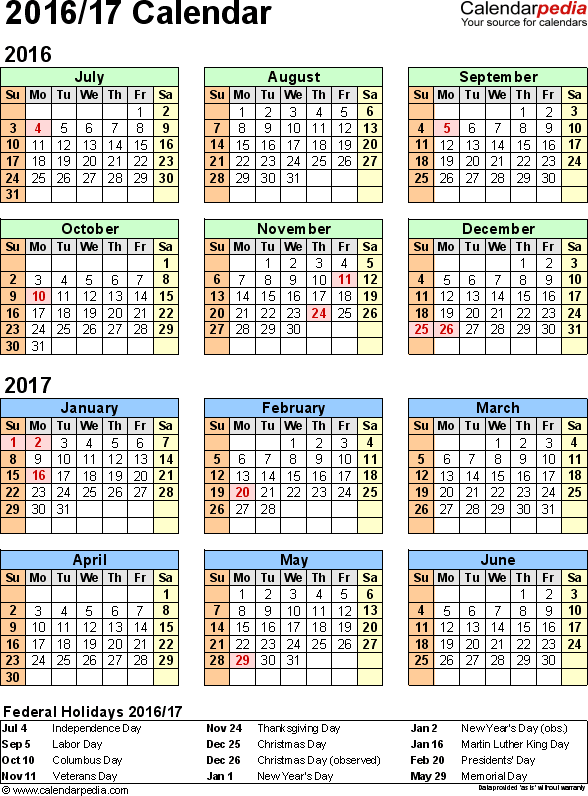
Template 1 shows the twelve months as columns on a landscape sheet, with every date on its own row, and template 2 is a classic year at a glance in portrait with a federal holidays table.
Template 1 shows the twelve months as columns on a landscape sheet, with every date on its own row, and template 2 is a classic year at a glance in portrait with a federal holidays table.
Two calendar years, two colors
The 2016 months carry a light green heading and the 2017 months a light blue one, so you can see at once which side of New Year a date falls on. Saturdays are shaded pale yellow and Sundays pale orange. To save color ink, you can print any template in black and white.
The 2016 months carry a light green heading and the 2017 months a light blue one, so you can see at once which side of New Year a date falls on. Saturdays are shaded pale yellow and Sundays pale orange. To save color ink, you can print any template in black and white.
Landscape or portrait
Template 1 is in landscape and template 2 in portrait, both sized for US Letter paper (8.5 x 11 inches).
Template 1 is in landscape and template 2 in portrait, both sized for US Letter paper (8.5 x 11 inches).
US federal holidays already marked
Every federal holiday from July 2016 to June 2017 is printed in red on pale pink, and when one falls on a weekend, the observed day off is marked too (see observed holidays in our FAQ). Most templates print the holiday name beside the date.
Every federal holiday from July 2016 to June 2017 is printed in red on pale pink, and when one falls on a weekend, the observed day off is marked too (see observed holidays in our FAQ). Most templates print the holiday name beside the date.
Ready to print
Open the PDF calendar in your browser or any PDF reader and print the whole July to June span, or just the sheet you need. Choose "Actual size" (100%) for US Letter paper, or "Fit to page" if your printer cuts off the edges. Want to type in your dates first? Use the editable Excel or Word version of the same calendars.
Open the PDF calendar in your browser or any PDF reader and print the whole July to June span, or just the sheet you need. Choose "Actual size" (100%) for US Letter paper, or "Fit to page" if your printer cuts off the edges. Want to type in your dates first? Use the editable Excel or Word version of the same calendars.
Split year calendars 2016/17 in PDF format,
landscape orientation (1 template)
Wide sheets, made for a wall: an office chart, a project board
or a planner a whole team can read from across the room.
or a planner a whole team can read from across the room.

landscape, 1 page,
July to June on one sheet
Template 1 (PDF)
Printable split year calendar 2016/17
split year wall calendar, landscape, 1 page
- calendar for second half 2016 and first half 2017 on one page (running from July 1, 2016 to June 30, 2017)
- months arranged horizontally (along the top), days vertically
- 1 page, landscape orientation (horizontal)
- US federal holidays in red , on observed and actual dates
- holiday names printed beside the date, with Easter marked as well
- weekends shaded in pale yellow for Saturdays and pale orange for Sundays, so working days stand out
- suits an office wall, a project board or a shared bulletin board
Download template 11 page · 28 KB · pdf file
Split year calendars 2016/17 in PDF format,
portrait orientation (1 template)
Upright sheets for the places landscape will not fit: a binder, a folder, a desk
or the narrow strip of wall beside a door.
or the narrow strip of wall beside a door.
portrait, 1 page,
year at a glance
Template 2 (PDF)
Printable split year calendar 2016/17
year at a glance, portrait, 1 page
- calendar for second half 2016 and first half 2017 on one page (running from July 1, 2016 to June 30, 2017)
- 1 page, portrait orientation (vertical)
- all 12 months as separate month blocks on a single portrait sheet, three across and four down
- one calendar quarter per row, so the change of calendar year falls between two rows rather than inside one
- US federal holidays in red , on observed and actual dates
- a federal holidays table at the bottom of the sheet, listing every holiday of 2016/17 with its date
- reads without explanation, so it works as a handout
Download template 21 page · 28 KB · pdf file
Split year 2016/17: federal holidays and key dates
Federal holidays from July 2016 to June 2017
All dates at a glance
There are ten federal holidays in the split year 2016/17, and all of them are marked in the PDF templates on this page:
There are ten federal holidays in the split year 2016/17, and all of them are marked in the PDF templates on this page:
- Monday, July 4, 2016: Independence Day
- Monday, September 5, 2016: Labor Day
- Monday, October 10, 2016: Columbus Day
- Friday, November 11, 2016: Veterans Day
- Thursday, November 24, 2016: Thanksgiving Day
- Sunday, December 25, 2016: Christmas Day (observed Monday, December 26)
- Sunday, January 1, 2017: New Year's Day (observed Monday, January 2)
- Monday, January 16, 2017: Martin Luther King Day
- Monday, February 20, 2017: Presidents' Day
- Monday, May 29, 2017: Memorial Day
The two halves in numbers
July 1 to December 31, 2016 has 184 days, 131 weekdays and 125 working days; January 1 to June 30, 2017 has 181 days, 130 weekdays and 126 working days. That gives the whole split year 365 days and 251 working days (Monday to Friday, not counting the federal holidays and their observed days).
July 1 to December 31, 2016 has 184 days, 131 weekdays and 125 working days; January 1 to June 30, 2017 has 181 days, 130 weekdays and 126 working days. That gives the whole split year 365 days and 251 working days (Monday to Friday, not counting the federal holidays and their observed days).
Daylight Saving Time
Daylight Saving Time ends on Sunday, November 6, 2016, when the clocks go back one hour, and begins again on Sunday, March 12, 2017, when they go forward one hour. Hawaii and most of Arizona stay on standard time all year.
Daylight Saving Time ends on Sunday, November 6, 2016, when the clocks go back one hour, and begins again on Sunday, March 12, 2017, when they go forward one hour. Hawaii and most of Arizona stay on standard time all year.
Who uses a July to June calendar
Why a split year calendar
A split year calendar cuts the year in the middle rather than at the end. These run July through June, so they show the second half of 2016 and the first half of 2017 on one sheet. If the twelve months you care about straddle New Year, a January to December calendar splits them across two sheets - a split year calendar does not.
A split year calendar cuts the year in the middle rather than at the end. These run July through June, so they show the second half of 2016 and the first half of 2017 on one sheet. If the twelve months you care about straddle New Year, a January to December calendar splits them across two sheets - a split year calendar does not.
State and local government, and nonprofits
July 1 to June 30 is a common fiscal year in the US: it is the budget year for most US states, for a large share of counties, cities and school districts, and for a great many nonprofits. On a July to June calendar, budget cycles, grant periods, board meetings and reporting deadlines all sit on one sheet instead of being cut in half by January.
July 1 to June 30 is a common fiscal year in the US: it is the budget year for most US states, for a large share of counties, cities and school districts, and for a great many nonprofits. On a July to June calendar, budget cycles, grant periods, board meetings and reporting deadlines all sit on one sheet instead of being cut in half by January.
Businesses on a mid-year financial year
Plenty of US businesses run July to June rather than January to December, whether to match a customer's fiscal year, a seasonal trading cycle or an industry convention. Quarter ends, forecasting rounds, performance reviews, contract renewals and inventory counts all land where you can see them. The Australian financial year runs from July 1 to June 30 as well, so the same layouts suit a July to June financial year there - bear in mind that the holidays marked are the US federal holidays.
Plenty of US businesses run July to June rather than January to December, whether to match a customer's fiscal year, a seasonal trading cycle or an industry convention. Quarter ends, forecasting rounds, performance reviews, contract renewals and inventory counts all land where you can see them. The Australian financial year runs from July 1 to June 30 as well, so the same layouts suit a July to June financial year there - bear in mind that the holidays marked are the US federal holidays.
Clubs, societies and sports leagues
Membership organizations, clubs and sports leagues whose season runs across the winter fit a split year better than a calendar year: games, training blocks, membership renewals, subscription years, committee terms and the annual meeting.
Membership organizations, clubs and sports leagues whose season runs across the winter fit a split year better than a calendar year: games, training blocks, membership renewals, subscription years, committee terms and the annual meeting.
Anyone planning across New Year
A summer-to-summer view suits long projects, construction and renovation schedules, application and admissions cycles, rotations and temporary assignments, sabbaticals and extended travel, where a January to December sheet would split the work across two calendars.
A summer-to-summer view suits long projects, construction and renovation schedules, application and admissions cycles, rotations and temporary assignments, sabbaticals and extended travel, where a January to December sheet would split the work across two calendars.
Home and family
Free to print for the fridge or a home office, with vacations, school calendar dates, renewals and appointments visible across the whole span rather than stopping at December 31.
Free to print for the fridge or a home office, with vacations, school calendar dates, renewals and appointments visible across the whole span rather than stopping at December 31.
What to add to your 2016/17 split year calendar
Once the sheet is in front of you, these are the entries that usually go on first: the start and end of your own year, quarter boundaries and the closures around them; budget submission and approval dates, grant application and reporting deadlines and the year-end close; vacation and leave, performance reviews, contract and membership renewals, recruitment rounds and training dates; project phases, delivery dates, application and admissions deadlines, launches and go-live dates; and board and committee meetings, the annual meeting, the season schedule, conferences and the days the office is closed.
Once the sheet is in front of you, these are the entries that usually go on first: the start and end of your own year, quarter boundaries and the closures around them; budget submission and approval dates, grant application and reporting deadlines and the year-end close; vacation and leave, performance reviews, contract and membership renewals, recruitment rounds and training dates; project phases, delivery dates, application and admissions deadlines, launches and go-live dates; and board and committee meetings, the annual meeting, the season schedule, conferences and the days the office is closed.
Ideas for your printable split year calendar 2016/17
On the clubhouse or office bulletin board
Print the July to June year on 11 x 17 inch Tabloid paper with "Fit to page" for the clubhouse, the church hall or the office, with games, meetings and events written in. On cardstock it hangs flat all season, and laminated it takes dry-erase markers for a volunteer, coach or carpool schedule that changes week by week.
Print the July to June year on 11 x 17 inch Tabloid paper with "Fit to page" for the clubhouse, the church hall or the office, with games, meetings and events written in. On cardstock it hangs flat all season, and laminated it takes dry-erase markers for a volunteer, coach or carpool schedule that changes week by week.
Writing on your printable split year calendar by hand
Pencil in games and events while they are tentative and ink them in once they are confirmed, mark the annual meeting and the membership renewal date in a color of their own, and run a highlighter across the summer break and the holidays. With both halves of the season on one sheet, New Year is no longer a gap in the plan.
Pencil in games and events while they are tentative and ink them in once they are confirmed, mark the annual meeting and the membership renewal date in a color of their own, and run a highlighter across the summer break and the holidays. With both halves of the season on one sheet, New Year is no longer a gap in the plan.
Using the templates
Terms of Use
All templates on this site may be used free of charge, at home, at work and at school, provided that the Calendarpedia logo, the copyright notice with the website address ("© Calendarpedia® www.calendarpedia.com") and the disclaimer ("Data provided 'as is' without warranty") stay on the template. The templates may not be sold or built into products that are sold, and the blank templates (or copies with only minor changes) may not be offered for download on other websites. All content on this site is protected by copyright © 2011-2026 Calendarpedia®. All rights reserved. Data is provided 'as is' without warranty of any kind, may contain errors and is subject to change without notice. If you find a mistake, please let us know. Full details are in our Terms of Use.
System requirements and compatibility
Every template is saved in PDF (.pdf) format, the ISO-standardized document format (ISO 32000) that every device can open.
- Nothing to install
The file opens straight in the browser you are already using, on Windows, Mac, iPhone, iPad, Android and Chromebook alike, in Chrome, Edge, Safari and Firefox. Most computers also have a PDF viewer built in, such as Preview on a Mac or Microsoft Edge on Windows, so a double-click is usually all it takes. - Or use a dedicated PDF reader
Adobe Acrobat Reader is free for Windows, Mac, Android and iOS, and free alternatives such as Foxit Reader and Sumatra PDF open these files just as well. None of them is required: use one if you prefer it, not because the template needs it. - Open it from Google Drive
Upload the file to Google Drive and you can view and print it from anywhere you sign in, on any device, without installing anything. - Printing from a phone, tablet or Chromebook
You do not need a computer to get the template onto paper. On an iPhone or iPad, open the PDF and choose Share, then Print, and any AirPrint printer on your Wi-Fi will pick it up. On an Android phone, use the print option in the app's menu (under Share or the three-dot menu). On a Chromebook, Ctrl+P sends it to any printer already set up in Chrome. If there is no printer within reach, save the file to a USB drive or email it to yourself and print your template at the office, at a library or at a print shop. - Printing in black and white
To save color ink, you can print any template in black and white: the PDF reader or browser prints the colors as shades of gray. - Older devices and software
PDF has been the standard format for printable documents for many years, so the files also open in older PDF readers and on older computers, without any conversion.
Problems downloading, opening or printing a template?
Our FAQ explains how to print a template in a different size or in black and white, what to do if the edges are cut off, a download doesn't work or a file won't open in Excel or Word, and which other programs you can use.